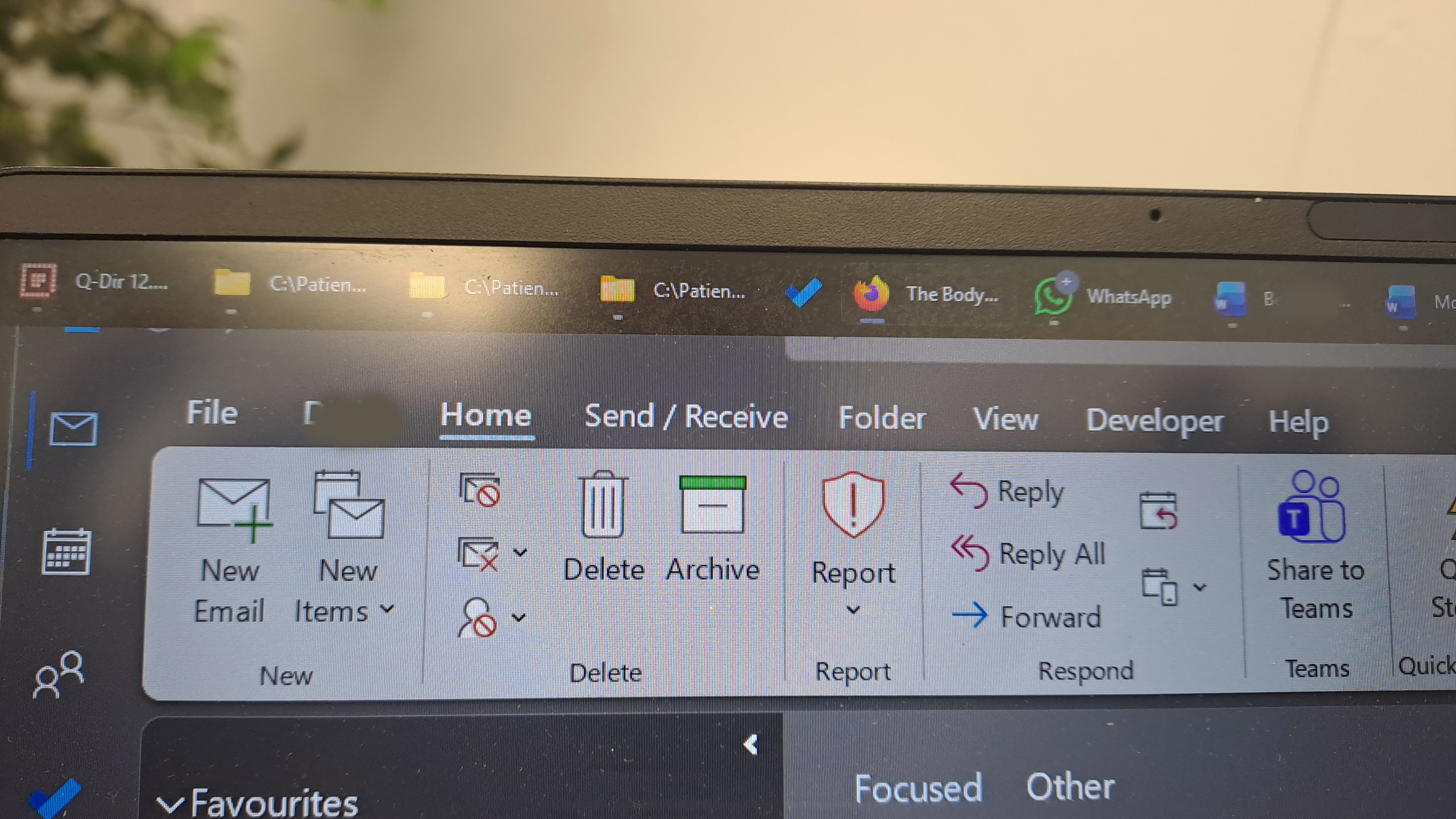
Taskbar chimera image when using two screens

Since the update to Star Dock 1.56, when I use two screens, I get a chimera image of the taskbar of screen 2 showing at the top left of screen 1.  It is scaled down and about 2/3 the size of the actual taskbar on screen 2.  It sometimes dissapears if I click on screen 1, other times persists and gets in the way.  When I go back to screen 2, it reappears on screen 1.  It clearly should not be there and is an annoying visual distraction.

324 views 7 replies
Reply #1 Top

Hello,

Sorry to hear you are having issues. But, there is no product name Star Dock. Was your referring to Object Dock or Start11? Need to be clear on it. Also, its help if you let us know more details on your Windows version and share some screenshots.

Thank you,

Basj,

Stardock Community  Assistant.

Reply #4 Top

Sorry I've taken a while to respond.  It proved impossible to take an ordinary screenshot.  Print screen doesn't capture the chimera -- that may be a clue.  I ended up having to take a photograph of screen 1.  The icons you see at the top left of my monitor are from the taskbar of screen 2.  Like a ghost image.  If I click on them, they dissapear.  Move my mouse off that screen and they reappear.

Something else I notice with this update to Start11 is that the icons on the main taskbar randomly change to some other icon.  For instance, the icon for an app get replaced by an icon for another app or even a folder icon.   This is actually even more annoying than the ghost image because I can't find the correct app and have to click everything to find the app I need.

Reply #5 Top

Please try, uninstall Start11, reboot immediately (important), download latest version available in your account product download page: https://store.stardock.com/myaccount/products. Install it, reboot immediately again. Retest it and report back.

If the issue still appear, we need more information.

  1. Windows 11 full version and OS Build number. Use Winver.exe to get these numbers.
  2. Start11 full version number installed.

Thank you,

Basj,

Stardock Community  Assistant

Reply #6 Top

If I uninstall, reboot and reinstall, does that mean I will have to set up Start11 from scratch?  It would be a huge nuisance to have to do that.

Reply #7 Top

Uninstalling should not remove your setting, unless you specifically ask it to remove setting while uninstalling.

Thank you,

Basj,

Stardock Community  Assistant