Start11 Swipe Up on Menu

Since the most recent update, swiping up on the taskbar does not trigger start11's start menu.

Either I get the windows 11 default start menu, or I get nothing at all.

Also touching the start button does not work, however if i connect a mouse I can click it ok to load the menu.

1,933 views 12 replies
Reply #1 Top

Hello,
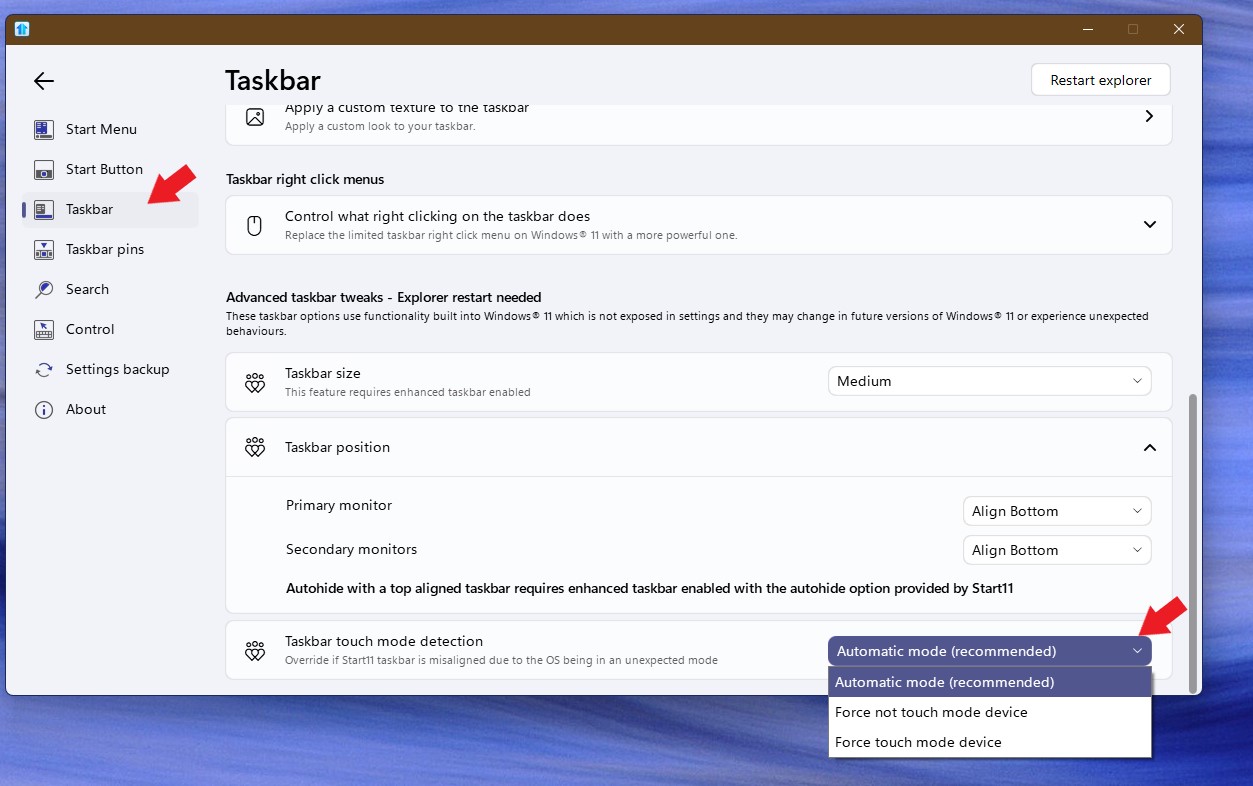
Sorry to hear you are having issues. Please try changing this setting and see if it make any different and report back.

Thank you.
Basj,
Stardock Community Assistant.

Reply #2 Top

Setting was already on Automatic. With either of the other options, it is more consistent (I always get a response), however it is the windows 11 default start menu not Start11.

For information I have a few of your softwares installed (Fences, WindowBlinds, Groupy, Multiplicity, TouchTasks as well as Start11). Latest versions of all are installed. I also have DisplayFusion Pro installed which I know has caused issues previously according to your change logs. Current version of Winows is Win 11 24H2.


Reply #3 Top

I notice you have Stardock's Touchtasks installed on you Windows 11. Do know that Touchtasks is not officially compatible with Windows 11. Not sure if it was the cause of your issue, but you could try uninstall it, reboot and test it.

Thank you,

Basj,
Stardock Community Assistant

Reply #4 Top

I've always had Touchtasks installed and never been an issue before.

I will however, remove it to see if this resolves my current issue as Start11 is more important than Touchtasks even though they serve a different purpose.

I will post back with an update.

Reply #6 Top

May I know more information on your system.

  1. Windows 11 24H2 OS Build number. Use Winver.exe.
  2. Start11 full version number.

Thank you,

Basj,
Stardock Community Assistant

Reply #7 Top

Windows Ver: 24H2 26100.2894

Start11 Ver: 2.51

Part of the issue may be caused by WindowBlinds. When I had no theme attached, swiping up over the start button brought up Start11, however swiping up on the bar still brought up the windows default.

With WindowBlinds theme activated, swiping up on the start button is the same as swiping on the bar.

If I turn off "Optimise taskbar for touch interactions..." from the windows personalisation>taskbar setting, then the bar stay available so I can at least tap on the start button to get start11 menu. Not ideal, but a short term solution.

Reply #8 Top

Hello,
I have forwarded your problem/question to Stardock Support Team for their assistance. Please keep an eye on this thread for any updates. We appreciate your feedback and patience.

Basj,
Stardock Community Assistant

Reply #9 Top

Hi. I'm having the same issue, is there a fix yet? 
OS: 25H2, 26200.9711
win arm64 laptop with touchscreen.
start11 version: 2.81

Reply #10 Top
Quoting Aloysius13, reply 4148804

Hi. I'm having the same issue, is there a fix yet? 

OS: 25H2, 26200.9711

win arm64 laptop with touchscreen.

start11 version: 2.81

End of Aloysius13's quote

Hello,
Sorry to hear you are having issues. Do you also running Windowblinds in your system? And, which suggested steps above, you already done to troubleshoot your issue?

Thank you,
Basj,
Stardock Community Assistant.

Reply #11 Top

I dont have windowblinds, I'm using only start11 at the moment, the only other thing would be dynamic edge(ms store app) but the issue was there before i installed this. outside of this my windows/explorer is vanilla. i am using nilesoft shell but that isnt related to the start menu. I have already tried autohide on/off in windows while also trying each of the automatic, force touch mode and force not touch mode options. its bottom aligned btw and i have no secondary monitors.

Reply #12 Top

Here is what I get on NileSoft Shell vs Start11.

When Stardock Start11 is running, it injects its own custom hooks and replaces the right-click context menu on the Windows 11 taskbar, which directly conflicts with Nilesoft Shell and prevents Nilesoft's custom context menu from appearing.

The Root Cause

• Taskbar Hook Interference: Start11 takes over taskbar management and injects a proprietary right-click pop-up menu even when basic taskbar customization options inside Start11 are toggled off.
• Context Menu Replacement: Start11 overrides the native Windows shell context hooks on the taskbar, breaking third-party shell extensions like Nilesoft Shell.
Thank you,
Basj,
Stardock Community Assistant