Unwanted update

I'm perfectly happy with Version5

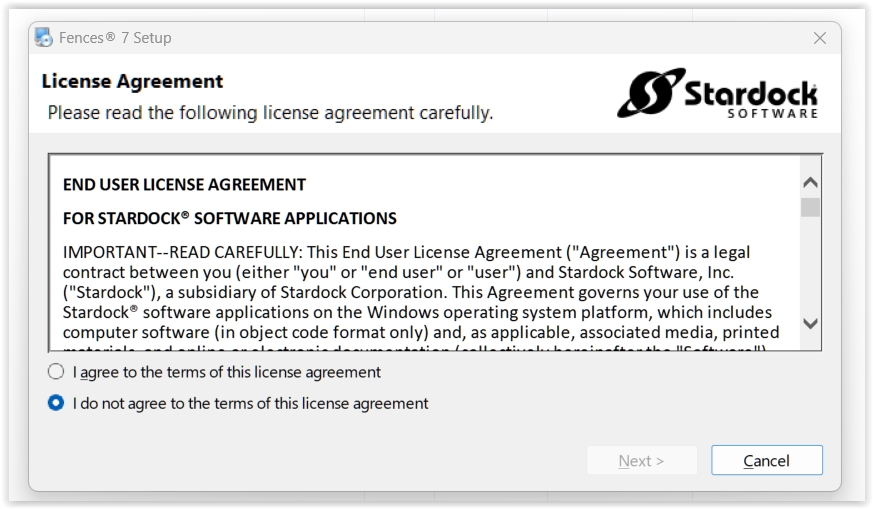
A while back I saw a popup on my desktop that said "Fences Version 4" along with the word "Update". Figuring that this was an update to my existing copy, I clicked proceed. Of course, the update was for Version 7 which I didn't realize until the Purchase options came up. By that time my copy of Version 4 wouldn't work and I had to kill the update, uninstall Version 4 and then reinstall my older copy from scratch. 

Whenever I see Update from other software vendors for programs I've installed, it means that my existing version is ready for updating NOT that a newer paid version is to be installed.

The supposed Update option should be changed to Upgrade so as not to be misleading, as it currently is.

How do I stop the Update prompt from showing up every day?
 

210 views 4 replies
Reply #1 Top

Hello,
Sorry to hear you are having issues. I don't see this one on my system while I was running Fences 6 and Fences 7 was released. Don't they usually have something like "Don't show this again" button somewhere in the popup? If possible please post a screen of this popup so I can forward it to Support.

Thank you,
Basj,
Stardock Community Assistant.

Reply #2 Top

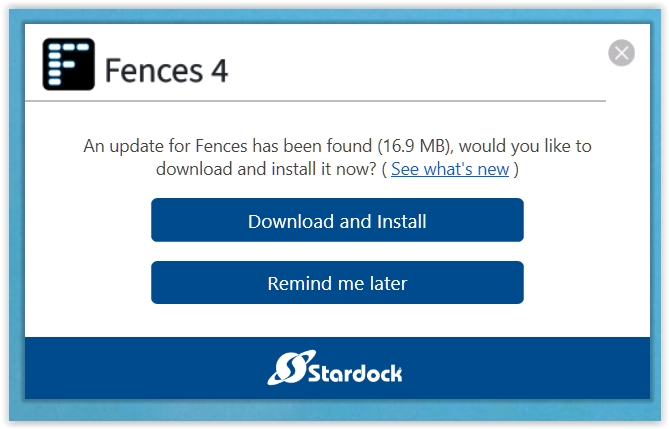
This just popped up on my desktop - it sure looks like it's offering an update to Fences 4. There's also no "Don't show this again" button.


Reply #4 Top

Hello,
Hmm, that does seem strange. The update you mentioned is intended for Fences 4, and it should not download or install Fences 7.
From what I can see, the installer filenames are typically different as well. For example, a Fences 4 installer would usually be named something like Fences4_setup.exe, while a Fences 7 installer would be named Fences7_setup.exe. Because of that, it would be unusual for a Fences 4 update to install Fences 7 unless something unexpected occurred during the process.
To be safe, I have forwarded your question and findings to the Stardock Support Team for further review and assistance. Please keep an eye on this thread, as we will post any updates here once more information becomes available.
We appreciate your feedback, patience, and assistance in bringing this to our attention. Thank you.


Basj,
Stardock Community Assistant