Hide cloud sync status indicators

Cannot toggle this option off

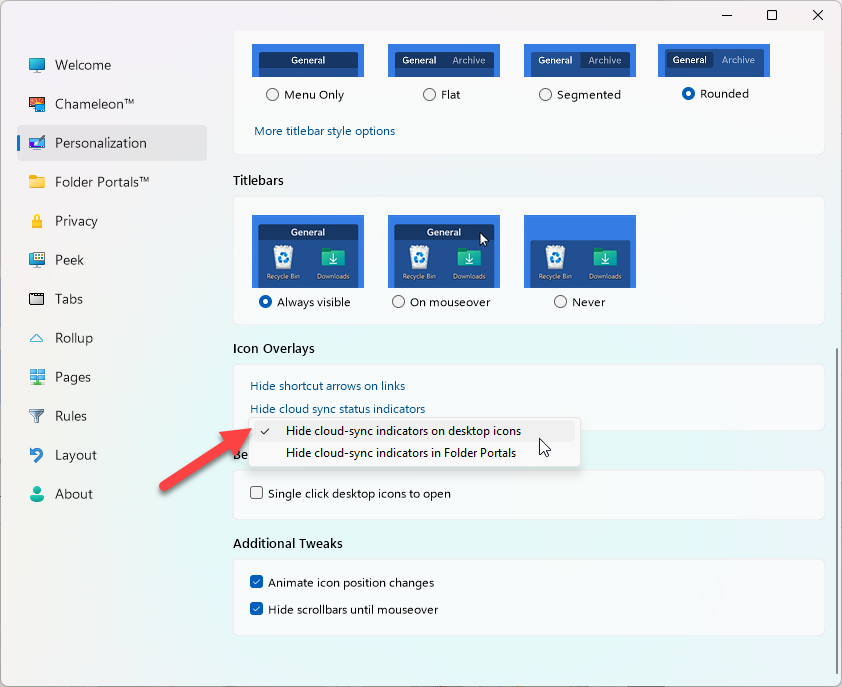
While I appreciate that most people would like to have the cloud-sync indicator hidden - and that is the default in v7 of Fences - I prefer to have mine showing but cannot toggle the default "enabled" to off. I have tried removing the checkmark for the setting (and I can remove it for portal folder), but it refuses to toggle off. What am I missing here?

98 views 2 replies
Reply #1 Top

Hi mark,

Yes! We confirmed this is broken in the final builds as some defaults did some shifting, and that will be repaired for the upcoming 7.01.

Weirdly, this had gotten tied up alongside the defaults-establishment for the new setting "Navigate to root" in the Folder Portals settings. So, if you toggle that setting on and off, the menu for "Hide cloud-sync" will then toggle as expected.


Reply #2 Top

Excellent. Thanks for the info and guidance on the short term fix. Works for me with that root folder option toggled on. Cheers.