Falkon7 Falkon7

Atomic Alarm Clock 6

Atomic Alarm Clock 6

alarm clock and skinnable tray clock

http://drive-software.com/atomicalarmclock.html

Your Windows system tray clock does its job, right? But that’s all it does, really, and you’ve spent years looking at the same, old boring interface.

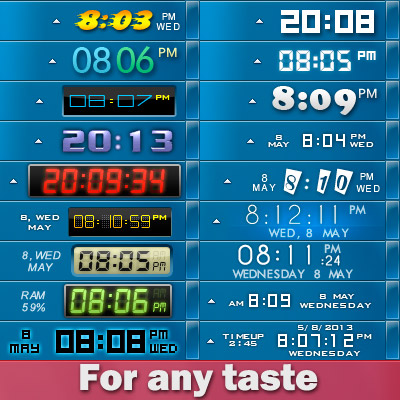
When you launch the application, your default Windows clock will be replaced. If you are not satisfied with the looks of your new clock, you can select a different skin, on its main settings panel.

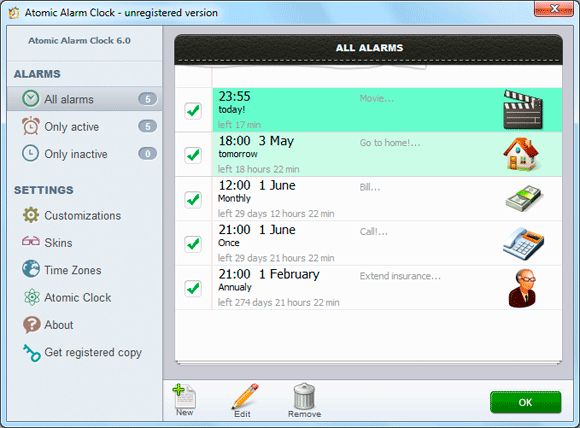
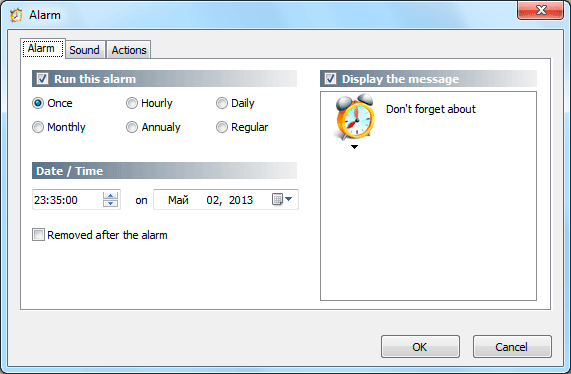
The utility also allows you to set up alarms and can also schedule various actions to be performed at the user defined time, such as wakeup, rebooting, shutting down or hibernating the computer. Atomic Alarm Clock enables you to set up alarms to occur once, hourly, daily, weekly, monthly or even annually, with a wide array of actions to be performed.

All in all, Atomic Alarm Clock is a nice tool and it's one of the apps to be installed on every machine out there.


Home page:  http://drive-software.com/atomicalarmclock.html

Download:    http://drive-software.com/download/ataclock.exe

I lowered the price from $29.95 to $4.99 for WC users :)  Order page.


p.s.I am the author of this program, I will be glad to hear your suggestions and recommendations.



211,366 views 64 replies
Reply #52 Top

I never commented before for one good reason: I'm sticking to the freeware "Skinny Clock"

and most of all I really like to custumize the tray clock skin using my own image pngs

well you can consider this a feature request ! :-"

please have a look here > http://frankell.deviantart.com/art/TrayBar-UserPic-and-More-217719849 


Reply #53 Top

it's an interesting idea, thanks! )

Reply #54 Top

More skins would be nice. I use the paid version, would like more skins.


Or an easy way to make/alter skins.

Reply #55 Top

Quoting RedneckDude, reply 54
would like more skins.


Or an easy way to make/alter skins.
End of RedneckDude's quote

Same goes for me.

Reply #56 Top

What's WC? <_<

Reply #57 Top

WC is for WinCustomize and actually you are a WC user ! ;)

Reply #58 Top

Well, sort of.  He posted from Stardock Forums to a WC thread that was cross-posted to a lot of other Stardock forums, including forums.stardock.com. =)

Reply #59 Top

Quick question here.. What am I doing wrong when trying to create my own skin? It just doesnt come out right... I even copied a skin folder that came with it and simply changed the colors and it still has off colors, and doesnt come out how I want it... Whats wrong or going on? I love this app, but i want/need just a little bit different color scheme...

Reply #61 Top

 I love this app, but i want/need just a little bit different color scheme...

So say we all. Have you tried contacting the creator of the software?  He's a long time member, as are you, mwzun. Maybe a mutual friendship can get something done that will benefit all. ;)

Good Luck.

Reply #62 Top

I like this software as well. Too bad updated versions won't take my key.


I may have to purchase the latest version.  ;)

Reply #63 Top

QUOTE RedneckDude

I like this software as well. Too bad updated versions won't take my key.


First see the quote works. lol.

I updated and my key works. Think you should get a hold of the guy. It's not that hard to make your own skins once you learn the tricks. I actually made the number and letter templates so I can change them to any text color I want.

Reply #64 Top

Quote DaveBax: First see the quote works. lol.
End of quote

It's only broken if you don't want to manually type in the  quote .......you know, the old fashioned way. :-"